In Suomisport, you can easily purchase a licence, game pass, and, if needed, insurance for your child online or through the Suomisport mobile app.
You can always find valid licence, game pass, and insurance information in your Sport Account and in the Suomisport app.
For questions regarding pricing, validity, or cancellation of licences and game passes, please contact your sport's national federation first. Licences and game passes are products managed by the sport federations.
DIRECT LINKS
- First, make sure your child has a Sport Account and that a guardian connection exists between you
- Purchasing a licence, game pass, or insurance
- I'm not sure if I have a Sport Account or I'm having difficulties purchasing a licence
First, make sure your child has a Sport Account and that a guardian connection exists between you
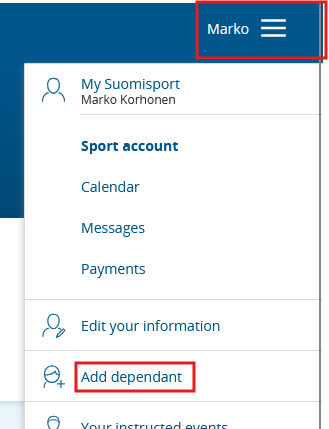
Log in to your Sport Account and check your dependants. If your child is not yet visible in your Sport Account, you can add them by selecting "Add dependant".
Note: The other guardian may already have added the child to their Sport Account. In this case, it is recommended to link the guardian relationships so that both guardians can view the child's information.
For security reasons, adding another guardian can only be done by:
- the first guardian, or
- Suomisport Customer Service.
Image: "Add dependant" button in the browser version
Purchasing a licence, game pass, or insurance
- Log in at www.suomisport.fi by selecting Log in, or open the Suomisport mobile app on your phone.
- Select Purchase licences and insurance.
- Select licence purchase, choose the desired sport, and select the child for whom you are purchasing the licence.Next, choose your club from the list.
- Complete the licence purchase by adding insurance if required and pay using your preferred payment method.
- After payment, you will see the purchased products in your dependant's Sport Account.
I'm not sure if I have a Sport Account or I'm having difficulties purchasing a licence
If you are unsure whether you have a Sport Account, or if Suomisport indicates that your account is locked, please contact our customer service at suomisport@olympiakomitea.fi or submit a support request using the support request form.
Was this article helpful?
That’s Great!
Thank you for your feedback
Sorry! We couldn't be helpful
Thank you for your feedback
Feedback sent
We appreciate your effort and will try to fix the article