An adult child or the guardian of an adult child can remove the guardian link through their own Sport account, provided that the child’s Sport account contains contact information (email address and mobile phone number).
If the contact information is missing, the guardian can add it to the child’s account through the "Edit information" -section.
Suomisport does not automatically remove guardian links when a child reaches adulthood.
As a Guardian
You can remove the link to your dependent by logging in to your own account and then accessing the dependent’s account by clicking their name.
In the dependent’s account, click Edit Information and remove the guardian link on the page that opens.
Removing the link requires that the dependent has their own login credentials added to the account, meaning an email address and phone number.
Image: Accessing the dependent’s Sport account

As the Dependent
You can remove the link to your guardian by logging in to your own Sport account using the login details already added to your account (email address).
If your account does not have an email address or phone number added, ask your guardian to add them for you or contact customer service at suomisport@olympiakomitea.fi.
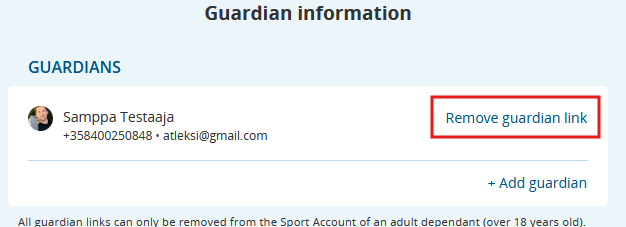
You can remove the link in "Edit Information" in your Sport account by clicking Remove Guardian Link.
Image: Edit Your Information button
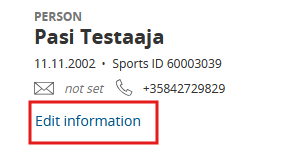
Image: Removing the Guardian Link
Was this article helpful?
That’s Great!
Thank you for your feedback
Sorry! We couldn't be helpful
Thank you for your feedback
Feedback sent
We appreciate your effort and will try to fix the article